How to Manage Customer Orders and Communication More Efficiently
Manage customer orders efficiently with centralized tracking, courier integration, automated updates, and better communication for eCommerce growth.
You've probably already noticed that getting the order is the easy part. The real work — confirming it, preparing it, getting it to a courier, keeping the customer updated, and handling whatever goes wrong along the way — is where most online businesses quietly lose hours every day. In this guide, we'll walk through exactly how to manage customer orders and communication more efficiently, so you spend less time chasing updates and more time growing the business.
Key Takeaways
Order management gets harder, not easier, as volume grows. Manual tracking that works at 10 orders a day breaks down completely at 100 or more.
Cash on delivery remains the dominant payment method in Bangladesh, with over 90% of ecommerce users preferring COD over digital payments — Source: International Trade Administration via DHL Express, 2025.
A centralized dashboard reduces the need to switch between tools for orders, customers, courier tracking, and returns.
Automated courier integration removes repetitive data entry, cutting down on the manual copy-paste that causes shipping errors.
Structured SMS notifications reduce "where is my order?" messages by keeping customers informed automatically at each delivery stage.
Bangladesh's ecommerce market generated roughly $6 billion in revenue in 2025, growing 20–25% year-over-year — Source: ECDB, 2025.
Platforms like B2roll bring orders, customers, courier operations, and returns into one merchant dashboard, reducing operational friction for growing stores.
What Is Order Management in Ecommerce?
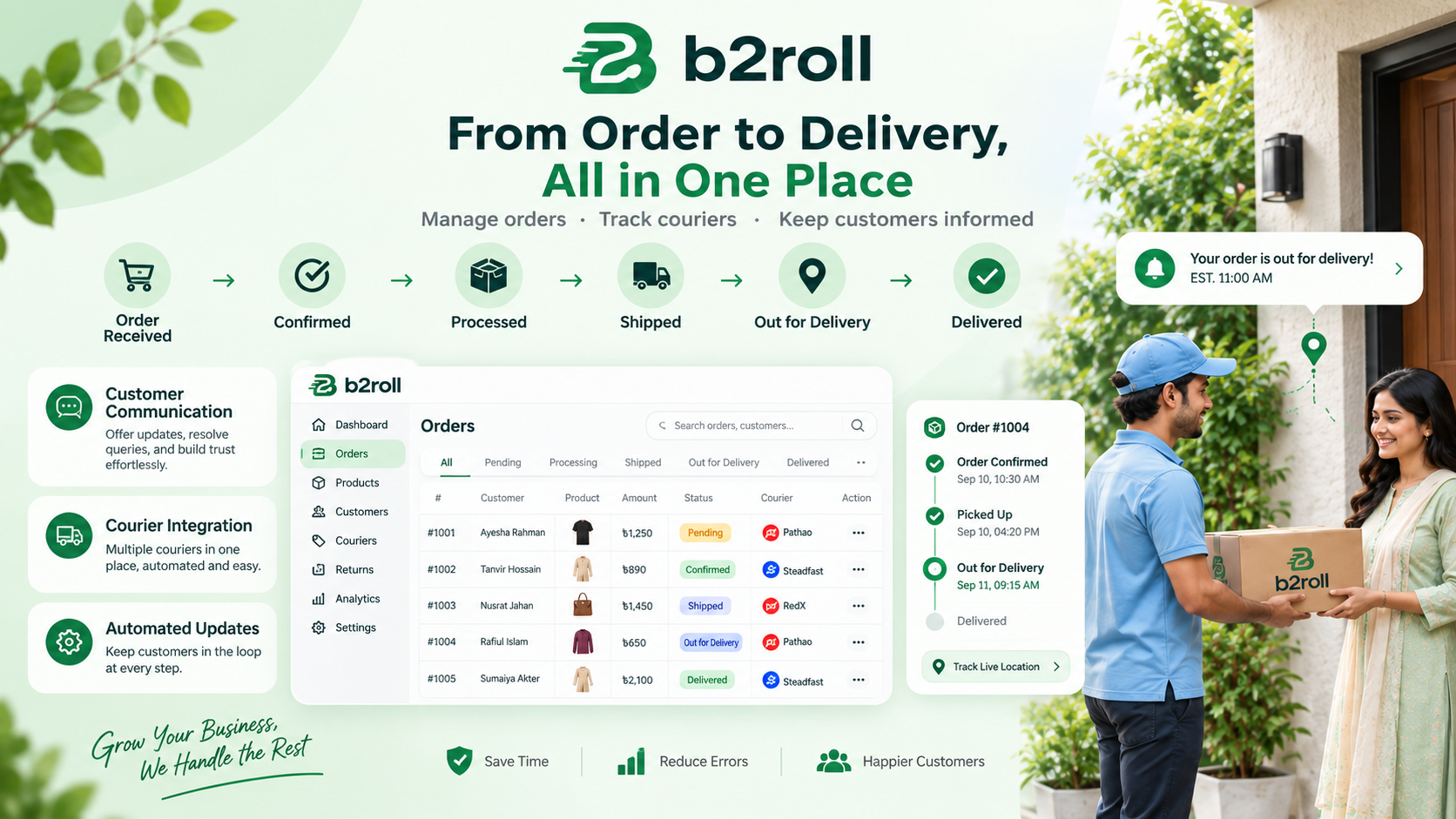
Order management is the process of tracking a customer purchase from the moment it's placed until it's delivered, confirmed, and closed out — including any returns or exceptions along the way. It covers every stage an order passes through: received, confirmed, processed, shipped, out for delivery, and delivered.
For a small store taking a handful of orders a day, this process can live entirely in someone's head or a notebook. That stops working almost immediately once volume grows. Order management, at scale, is really communication management — because every stage of the order journey usually comes with a customer question attached to it.
This is why order management and customer communication are treated as one connected system rather than two separate jobs. When they're handled together, a business owner can see not just where a parcel is, but what the customer already knows about it.
Why Does Efficient Order Management Matter?
Efficient order management matters because every stage an order passes through is also a point where something can go wrong — a missed confirmation, a delayed courier handoff, or a customer message that goes unanswered for hours. The more manual steps sit between "order placed" and "order delivered," the more room there is for delay and error.
For example, a customer places an order through an online store, but the business still has to confirm it, prepare it for shipment, hand the right details to a courier, and track its delivery status the whole way through. If even one of those steps depends on someone remembering to check a spreadsheet or a Messenger thread, the order can quietly stall.
At the same time, this isn't just an internal operations problem — it's a customer experience problem. A customer who doesn't hear back about their order status is far more likely to message again, cancel, or simply not order again. Cash on delivery remains the dominant payment method in Bangladesh, with over 90% of ecommerce users preferring it over digital payment options — Source: International Trade Administration via DHL Express, 2025. That matters here specifically because COD orders carry more operational steps than prepaid ones — payment collection, reconciliation, and higher return risk — which makes clean order tracking even more important.
Platforms such as B2roll are built around reducing this exact kind of friction, bringing order management, customer management, courier operations, returns, products, and coupons into a single merchant dashboard.
How Do You Build a Clear Order Management Process?
You build a clear order management process by defining a fixed sequence every order follows, so nothing depends on memory or guesswork. A typical ecommerce order journey looks like this:
Order received → Order confirmed → Order processed → Shipped → Out for delivery → Delivered
Why a Fixed Workflow Beats Ad-Hoc Tracking
An ad-hoc system — where order status lives in someone's head, a notebook, or a scattered chat thread — works fine at low volume and fails predictably as orders increase. A fixed workflow, on the other hand, gives every order a known status at every point in time, whether it's order one or order one thousand.
For example, a merchant using a structured workflow can automate COD checkouts into courier consignments, with tracking status moving through defined delivery stages without anyone manually updating a spreadsheet. This is the model B2roll's order and courier system is built around — automated order processing where COD checkouts flow directly into consignments.
What Happens When Order Stages Aren't Clearly Defined
When order stages aren't clearly defined, staff end up re-checking the same orders repeatedly just to figure out what's already been done. That repeated checking is pure wasted time — it adds nothing to the business except the illusion of being busy.
Instead of trying to remember which orders are waiting on confirmation and which have already shipped, a merchant using a dashboard can see order status at a glance. This becomes especially valuable once a business starts receiving a meaningfully larger number of orders every single day.
How Do You Keep Customer Communication Organized?
You keep customer communication organized by connecting customer information directly to order activity, rather than storing them in separate places. Customers commonly ask a short, predictable set of questions:
Has my order been confirmed?
When will it be shipped?
Where is my parcel right now?
Can I return the product?
How long will delivery take?
When customer details and order status live in different systems, answering even a simple question takes longer than it should. A support reply that requires checking three different tools before responding isn't really "fast" — it just feels fast to the person typing it.
A centralized system solves this by linking customer records directly to their orders. B2roll's dashboard includes a dedicated Customers section where merchants can monitor customer activity alongside order and business insights, so the person answering a message already has the full picture in front of them.
The real goal here isn't just responding faster — it's making sure whoever responds has the correct information the first time. Faster wrong answers are worse than slightly slower correct ones, especially when a customer is deciding whether to trust your store again.
How Can You Reduce "Where Is My Order?" Messages?
You can reduce "where is my order?" messages by giving customers visibility into their delivery status automatically, instead of making them ask for it. Delivery updates are consistently one of the most common reasons customers contact an online business.
If customers can't see what's happening with their parcel, they send repeated messages asking for updates — which quietly turns a support inbox into a full-time status desk. B2roll connects order processing directly with courier integrations and tracking, including services like Pathao, Steadfast, and RedX, so status synchronization and SMS alerts can keep customers informed without manual follow-up.
This means the business isn't stuck manually checking courier portals and then retyping updates into customer chats one message at a time. Automated tracking and notifications make delivery more transparent while cutting down on repetitive communication work — which is exactly the kind of task that eats hours without ever showing up as "real" progress.
How Do You Connect Your Courier With Your Order Workflow?
You connect your courier with your order workflow by linking courier operations directly into the same system that manages your orders, instead of treating them as two disconnected tasks. Courier management becomes genuinely difficult when a business owner has to repeatedly copy customer names, phone numbers, addresses, and order details from one system into another.
Manual data entry doesn't just cost time — it creates room for mistakes, and a single typo in an address or phone number can mean a failed delivery. With B2roll, merchants can connect supported courier services and manage courier-related operations from the same ecosystem as their orders, with a dedicated courier area for managing parcels and tracking their status.
This creates a genuine connection between order management and delivery management, rather than forcing the business to bridge the two manually every single time an order goes out.
How Should You Handle Returns Without Losing Track?
You should handle returns by managing them within the same system that tracks orders, rather than through separate notes or spreadsheets. Not every order ends in a successful delivery — customers request returns, products get sent back, and some orders need additional attention before they're fully closed out.
When returns live in scattered messages or disconnected records, it becomes genuinely hard to know which orders are actively being returned and what action each one needs. B2roll includes a dedicated Returns section alongside Orders, Customers, Products, and Courier operations, keeping the full lifecycle of an order — including what happens after delivery fails — inside one platform.
The benefit here is straightforward: instead of digging through multiple tools to reconstruct what happened to an order, the business can keep the entire operational journey in one organized place.
Tools for Managing Orders and Communication From One Dashboard
The most practical way to apply everything above is through a single merchant dashboard that connects orders, customers, courier status, and returns in real time. Rather than checking Orders for purchases, Customers for activity, Courier for delivery progress, Returns for sent-back products, and Products for the catalog — all separately — a centralized platform like B2roll brings these areas together in one place.
This matters most for small and growing businesses, where one person is often responsible for several parts of the operation at once. Instead of spending the day moving between platforms, a merchant can run the core ecommerce workflow — orders, courier sync, customer communication, and returns — from a single connected system.
Free and lightweight alternatives — such as a shared Google Sheet paired with a courier portal and a WhatsApp Business inbox — can work at very low order volume. But they tend to break down fast once a business crosses even a few dozen orders a day, which is usually the point where a dedicated dashboard starts paying for itself.
What's Next: Building a Repeatable Order Management Workflow
The next step is turning everything above into a repeatable sequence your team follows for every order, not just a set of ideas. A practical version looks like this:
Receive the order — the customer places it through your online store.
Confirm and process it — the order moves through the correct stage without manual guesswork.
Send it to the courier — integration connects the order directly to the delivery process.
Track the shipment — the parcel's progress is visible without checking a separate portal.
Keep the customer informed — automated tracking and notifications reduce repeated manual updates.
Manage exceptions — cancelled, returned, or delayed orders get handled through the same dashboard.
As an online business grows, the real challenge isn't getting more orders — it's managing those orders without operations becoming unnecessarily complicated. Bangladesh's ecommerce sector generated roughly $9 billion in transaction volume in 2024, with a projected compound annual growth rate of 12% through 2027 — Source: PCMI, 2025. That kind of growth trajectory makes it worth setting up a scalable order workflow well before volume forces the issue.
Task
Manual Approach
Centralized Dashboard Approach
Order status
Tracked across notebooks or chats
Visible in one order pipeline
Courier handoff
Details copied manually
Synced automatically
Customer updates
Sent individually, on request
Automated via SMS at each stage
Returns
Logged in separate notes
Managed within the same system
Business overview
Pulled together manually
Available on one dashboard
Frequently Asked Questions
How can I manage customer orders more efficiently? Use a centralized order management system where orders, customers, courier delivery, and returns can all be monitored together. Automation can also reduce a lot of the repetitive manual tasks that eat up time as order volume grows.
How does courier integration help an online business? Courier integration cuts down on manually copying customer and order information between systems, and makes shipment tracking far easier to manage from one place instead of checking separate courier portals.
Why is customer communication important in ecommerce? Clear communication helps customers understand their order status, delivery progress, and return options — and it naturally reduces the number of repetitive "where is my order?" support messages a business has to handle.
Can B2roll help manage the complete order journey? Yes. B2roll provides tools for orders, customers, courier operations, returns, and automated order processing, all within one merchant platform.
What's the benefit of managing ecommerce operations from one dashboard? A centralized dashboard removes the need to switch between multiple tools throughout the day, giving business owners a clearer, more organized view of daily operations as they scale.